Targeting a Frame
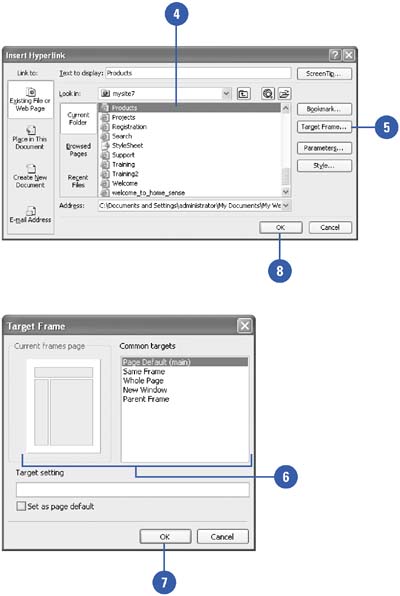
Sometimes you want a link in one frame to display content in another frame. This type of link is called a target frame. When you link a target page to a frame, you need to know the name of the frame you want to target, and the name of the Web page file you want to link to the frame.
Create or Edit the Target Frame
 | Click the View menu, click Page, and then open the frames page you want to use. |
 | Select the normal (create) or hyperlinked (edit) text or graphic. |
 | Click the Insert Hyperlink button on the Standard toolbar. |
 | Enter or verify the file name for the targeted frame. |
 | Click the Target Frame button. |
 | Select the option you want. |
In the Current Frames Page area (a map of your frames page), click the frame you want to designate as the target frame. In the Common Targets box, click the target frame you want to designate as the target.
 | Click OK. |
 | Click OK. |
|
